I recently experienced unexpected behavior of GREP when using wildcards to search contents of files for content that I knew to be present in files in a directory. Analysis concluded that installation of a new version of GREP, which was installed with Git and landed earlier in PATH vs. the version I have used for many years caused the discrepancy. The new grep changed the wildcard expansion to be UNIX like where case in filenames matters, vs. WINDOWS like where case is ignored in file name comparisons.
The “old” version of GREP is GNUTOOLS version 2.5.4 from year 2009 and the “new” version of GREP is GNUTOOLS 3.0 from 2017. Yes, writing this post in 2026, so “new” is – well, its still new.
To test, I created two files in a temporary directory, named “hello1.txt” and “HELLO2.txt” and set old and new versions of grep loose looking for contents in files in the temporary directory with a variety of flags.
The AI is wrong
Searching the internet, the AI search engine provided assistive text that says the “-i” flag will cause filenames to have case ignored in addition to the contents comparison. This is false.
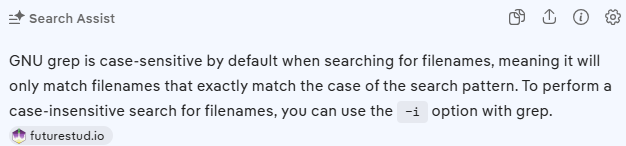
I followed the web link referenced by the AI, and the author made no such claims.
Back to study
With two files that start with “H” and “h”, the old grep will search both files when given “h*” or “H*” as the search pattern. Compare to the new GREP which will search only files with matching case!
Regular expressions
Further digging says that version 3.0 GNU Grep does file inclusion based upon regular expressions!
"C:\Program Files\Git\usr\bin\grep.exe" --with-filename Stuff [hH]*.txt While this is sure neat, I ponder … why do this? I’m going to guess that it was done for compatibility with expected behavior on UNIX.
Expectations and Conclusion
Wildcard expansion is … SUPPOSED to be the domain of the operating system! Here’s the Win32 API that does this work. FindFirstFileW. To complete that request, the provided search string goes down into the file system who does the actual work and saves a handle to know the search parameters for calls to FindNext. This way all the programs get the same answers based upon the same search criteria!
Seems that GNU GREP did an on-purpose to make GREP command line wildcard expansion follow the same behavior as on UNIX shell. While that may drive some positive compatibility with UNIX, it changes behavior on Windows!
Is that good, or bad? The answer is probably that … it depends.
Botton line: It is good to be aware of the changes.
Here is the script I used to do the testing
@echo Demonstrate GNU Grep changed wildcard expansion between 2009 and 2017
@echo GREP Versions are 2.5.4 from 2009 and 3.0 from 2017 distributed with Git
“C:\util\gnutools\grep.exe” –version | grep “GNU grep”
“C:\Program Files\Git\usr\bin\grep.exe” –version | grep “GNU grep”
@echo.
if exist hello1.txt erase hello1.txt
if exist hello2.txt erase hello2.txt
echo Stuff>hello1.txt
echo Stuff>HELLO2.txt
dir /b hello*
type hello1.txt
type HELLO2.txt
@echo.
@echo Observe OLD/NEW same handling of *.txt
“C:\util\gnutools\grep.exe” –with-filename Stuff *.txt
“C:\Program Files\Git\usr\bin\grep.exe” –with-filename Stuff *.txt
@echo.
@echo Observe different handling of h.txt
@echo Old uses Windows NTFS wildcard expansion – case is ignored.
@echo New is doing its own filename expansion, using UNIX style case sensitive filenames! “C:\util\gnutools\grep.exe” –with-filename Stuff h.txt
“C:\Program Files\Git\usr\bin\grep.exe” –with-filename Stuff h*.txt
@echo.
@echo Test with -i.
@echo Web says that in addition to changing file contents comparison to case insensitive, this will
@echo also make filename comparison case insensitive. False. The filename comparison remains case sensitive.
“C:\Program Files\Git\usr\bin\grep.exe” -i –with-filename -i Stuff h*.txt
@echo.
@echo New supports regular expressions! Old does not – triggers error.
“C:\util\gnutools\grep.exe” –with-filename Stuff [hH].txt “C:\Program Files\Git\usr\bin\grep.exe” –with-filename Stuff [hH].txt